Thinking Machines released Inkling 2 Mini on 20 November 2026: an open-weights model small enough to run on a laptop. To show it off, its researchers took it on a plane, switched on airplane mode, and had it build a playable flight simulator on a MacBook Pro in a few minutes. That flight simulator is the first Inkling 2 Mini game, and you can play it below.
This page covers the game, what Inkling 2 Mini is, how to run it on your own computer to make games, and what to expect compared with the big cloud models. So far: 1 game you can play and 1 demo shown only on video. The model is a day old; more games made with it will be added here as they appear.
Quick list
| Game | Made by | Type | Play |
|---|---|---|---|
| PlaneBench Flight Simulator | Thinking Machines, with Inkling 2 Mini running offline | 3D flight simulator | Yes, on desktop |
| Thinkyville | Thinking Machines, with Inkling 2 Mini | Pixel town simulation | Video only |
Play the flight simulator Inkling 2 Mini built offline
Thinking Machines' launch post says its researchers took Inkling 2 Mini on a flight, where it "ran offline on a MacBook Pro and built a playable flight simulator in a few minutes". The demo video shows the machine, a MacBook Pro with an M5 Pro chip and 48GB of memory, in airplane mode; most of the recording plays at 15× speed with a real-time timer. The post calls it the PlaneBench flight simulator demo.
The game itself is a small 3D flight simulator: take off from a runway and fly over procedurally generated hills, mountains and sea among the clouds. W/S or the up and down arrows pitch, A/D or left and right roll and turn, Shift and Ctrl change the throttle, Space resets and P pauses. A HUD shows heading, speed and altitude. It runs on Thinking Machines' site and needs a desktop browser and a keyboard.
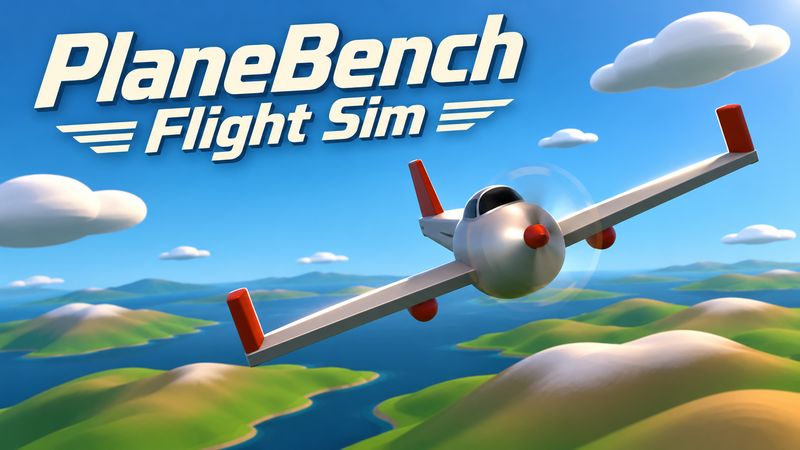
The flight simulator Thinking Machines' Inkling 2 Mini built offline on a MacBook Pro, mid-flight, in a few minutes: fly over procedural hills and sea.
Source: Introducing Inkling 2 Mini, Thinking Machines. The post does not publish the prompt or the coding tool the researchers used, so we can't tell you those.
Only on video: Thinkyville
The same post shows Thinkyville, "a tiny pixel town built by Inkling 2 Mini", where the model also runs all 20 villagers on one offline MacBook. They plan their day, gossip, host bake-offs and answer notes you leave on their doors. There is no public link to play it yet; we will add it if Thinking Machines publishes one.
What is Inkling 2 Mini?
Everything here is from Thinking Machines' launch post and model card, which is also the Hugging Face model card.
| Inkling 2 Mini | |
|---|---|
| Maker | Thinking Machines Lab |
| Released | 20 November 2026 |
| License | Apache 2.0, open weights |
| Size | 26.4B parameters in total, 3.4B active; about 5.4B effective active parameters per token because the middle layers run three times |
| Download | One checkpoint of about 20GB (NVFP4 and MXFP8) |
| Input / output | Text and images in, text out |
| Context window | Up to 1M tokens |
| Runs on | Apple silicon Macs with 32GB or more memory, an NVIDIA DGX Spark, other GPUs with 32GB or more VRAM recommended |
It is a looped transformer: of its 24 layers, the middle 12 run three times for every token. Thinking Machines says this lets the model reason more and reach the right answer with fewer tokens, especially in agentic coding. It was trained in 4-bit precision and ships in the same precision, so there is no conversion loss.
What it is good at, in Thinking Machines' words: it "does best on long-horizon agentic work", and among open-weights models under 100B total parameters it leads on agentic coding benchmarks such as DeepSWE v1.1 (48.2%) and SWE-bench Pro v2. It also uses search and tools well, and reads screens and documents well (76.5% on ScreenSpot Pro, 92.8% on OmniDocBench in their table).
How to make games with Inkling 2 Mini on your own computer
Thinking Machines supports running it on any Mac with at least 32GB of RAM via Ollama, on an NVIDIA DGX Spark, and through quantized GGUF versions from Unsloth and llama.cpp. If you don't have the hardware, you can chat with it in the Tinker Playground. Below are the commands as each project publishes them; check their pages for updates, because support for looped models in local tools is brand new.
Option 1: Ollama (Mac with 32GB+ memory)
From Ollama's Inkling 2 Mini page, which says it needs a Mac with 32GB+ memory and points to the Ollama pre-release download:
ollama run inkling-2-mini
To make a game, you want a coding agent rather than a chat window. The same page lists ready-made launchers for coding agents, for example:
ollama launch opencode --model inkling-2-mini
ollama launch claude --model inkling-2-mini
Option 2: Unsloth (Mac, NVIDIA or AMD)
Unsloth's run-locally guide recommends the 4-bit UD-Q4_K_XL quant (17.6 GB) and says 4-bit needs about 17–18 GB of RAM plus VRAM or unified memory; the 2-bit and 1-bit quants are smaller. In Unsloth Desktop you search for Inkling 2 Mini and pick unsloth/Inkling-2-Mini-GGUF. From the command line:
unsloth run --model unsloth/Inkling-2-Mini-GGUF:UD-Q4_K_XL \
    --temp 1.0 --top-p 1.0 --top-k 0 --min-p 0.0
It prints a local endpoint and API key that you can point your coding tool at. Unsloth also has a llama.cpp guide on that page; its main GGUF files need Unsloth's own llama.cpp build, with separate files provided for mainline llama.cpp.
Option 3: Llama App or llama.cpp
Hugging Face's launch post gives this command for a 4-bit GGUF (change the suffix to :Q8_0 for 8-bit):
llama serve -hf ggml-org/Inkling-2-Mini-GGUF:IQ4_NL
Llama App does the same from the macOS menu bar or Windows tray and gives you a local OpenAI-compatible API for coding agents.
Tips for the game itself
- Ask for one self-contained HTML file. That is how Hugging Face prompted its demos: "a single self-contained index.html", no external files or libraries. One file is easy to open, test and share, and you can then submit it to VibeGamer.
- Let it check its own work. For Hugging Face's Starry Night demo, the model had a screenshot helper and went through 24 rounds of screenshot checks.
- Set limits. The model card says it sometimes gets stuck in long reasoning loops, especially when debugging code, and recommends limits on output tokens and agent turns. It also says the model may delete or overwrite files without asking, so run agents in a sandbox or a fresh folder.
What to expect compared with big cloud models
Inkling 2 Mini is a small model you can run for free on your own machine, offline. That is the trade. What the sources say:
- Against its size class it is strong. Thinking Machines only compares it with open-weights models under 100B parameters, where it leads on most coding benchmarks. In their table it scores 20.1 on the Artificial Analysis Index v5.0, level with Qwen3.8-27B, and 77.9% on Vibe Code Bench v1.1 against 64.9% for Qwen3.8-27B.
- Against Qwen3.8-27B it is close. Thinking Machines says it is ahead on DeepSWE and SWE-bench Pro v2 but behind Qwen3.8-27B on some other tests, including multi-turn chat. Hugging Face says that in its own vibe tests Inkling 2 Mini is "at least comparable" with Qwen 3.8 27B, and that more validation is needed.
- It is not a frontier model. In its safety evaluation, Thinking Machines benchmarked its agentic capability against public frontier models and found it "materially below frontier capabilities". The model card adds that it trails larger models on hard reasoning tests, is more likely than larger models to state wrong facts with confidence, and is less reliable at following detailed instructions when using tools.
- Speed depends on your machine. The model card says support in local runtimes is new and speed varies by runtime and hardware.
So expect small, self-contained browser games like the flight simulator, made privately and offline, rather than the long, polished builds people are making with cloud models such as Claude Fable 5.2. We haven't put Inkling 2 Mini through our same-prompt game test yet. For a sense of what the biggest cloud models make, see Claude Fable 5.2 games you can play online and games made with Gemini; for every AI-made game on the site, see AI games.
FAQ
What is Inkling 2 Mini?
An open-weights model from Thinking Machines Lab, released on 20 November 2026 under Apache 2.0. It has 26.4B parameters in total with 3.4B active, takes text and images, and at about 20GB it runs on a Mac with 32GB or more memory or an NVIDIA DGX Spark.
Can I play the Inkling 2 Mini flight simulator?
Yes. It is free and runs in a desktop browser with a keyboard; Thinking Machines says to open it on desktop. Open it from the card above or its VibeGamer page.
How was the flight simulator made?
According to Thinking Machines, researchers ran Inkling 2 Mini offline on a MacBook Pro (M5 Pro, 48GB) during a flight, and it built the game in a few minutes. They have not published the prompt or the tool they used.
Can Inkling 2 Mini run on my laptop?
If it is an Apple silicon Mac with 32GB or more memory, Thinking Machines and Ollama say yes. On other hardware, Unsloth's 4-bit version needs about 17–18 GB of combined RAM and VRAM, and Thinking Machines recommends 32GB or more of VRAM for its own checkpoint.
Is Inkling 2 Mini free?
The weights are free to download from Hugging Face under the Apache 2.0 license, and running it on your own computer costs nothing beyond the hardware. It is also on Thinking Machines' Tinker platform.
Is Inkling 2 Mini better than Qwen 3.8 27B for coding?
On Thinking Machines' own benchmarks it is ahead on agentic coding tests such as DeepSWE and SWE-bench Pro v2 and behind on some others. Hugging Face calls it "at least comparable" in its vibe tests. Neither is an independent game-making test.
Checked on 21 November 2026. The flight simulator, videos and quotes belong to Thinking Machines; every entry links to the original. VibeGamer is independent and not affiliated with Thinking Machines.